
Tuesday, 7 May 2019
Week 31
This week i went a head and created another maze and looked for a troll assist that i could use for a mini boss during the maze.


Wednesday, 1 May 2019
Week 30
this week i went a head and decided to go out and do a bit of research on how to add a torch into the game. so i managed to be able to find the following you tube tutorial and started to follow it to implement it to my game.
Sunday, 21 April 2019
week 29
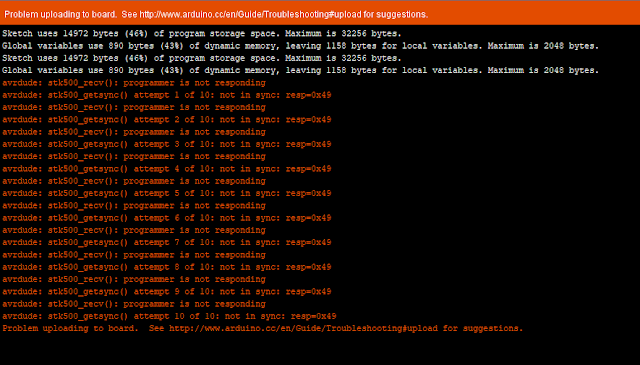
This week i am still struggling to get my head around the errors with the ubiquitous. so i tried a different computer to see if the errors would go or they would continue to appear.

Thursday, 18 April 2019
Friday, 5 April 2019
Week 27
this week i tried to get my head around the java gaming unit and also the ubiquitous computing units but i am struggling to understand the units and what to do. as with the java game design i tried to separate the code into different documents but the code then didn't want to run. also with the ubiquitous computing i just kept getting errors when trying to upload the code to the adruino
Monday, 1 April 2019
Week 26 - Menu page
This week during my project i decided to add a menu to the game so i went a head and went on YouTube to figure it out on how to do so i found the following video and tried to implement it.


After i watched this video i didn't no how to do JAVA script in unity so i went a head and found a new video that states how to do the menu using C#.
By being able to follow the video i went a head and created the following menu.

Also this week i went a head and added sound and also a title to the menu page of the game. the way i did this is by going online finding a song i wanted to add to my game and then added it to the canvas and made it loop as soon as the play button to lunch into the menu is pressed and also i went online to find a design i wanted for my title of my game. I went to the following site Fancy Fonts to create the design i wanted to use then i snipped it and put the title as an image onto the canvas of the menu so it looks like this.

Monday, 25 March 2019
Week 25
This week I went a head and finished James ubiquitous computing assignment
Also went a head and looked more into web based game. Due to not done a web based game before so I went online and started to find items I could use within the game
Wednesday, 20 March 2019
Week 24
This week i tried to set up the rassberri pie by installing the operating system on it and installing the software I need on there to be able to make a web based game
Tuesday, 26 February 2019
Week 22
This week i worked on James ubiquitous assignment and about what is ubiquitous after that i decided to go on the Xbox and play anthem.
Thursday, 21 February 2019
Week 21
This week i didn't do anything with the course work and assignments i just enjoyed the half term break and played xbox which gave me ideas for potentially future games i could work on.
Monday, 4 February 2019
Week 20
This week I went a head and did my write up for my game that i had made for the AI in games assignment.
Monday, 28 January 2019
Week 19
this week i went through the animation assignment to figure out what i had left to do on it so i wrote a checklist out for my self for me to mark off what i had done and needed to be done. after doing that i went a head and did my write ups for my character and train. after i did that i went a head and rendered the video and added sound to the final rendered version of file. after completing the assignment to the best of my ability i then went a head and played a bit of the anthem demo to get ideas on terrain building for my game.
Monday, 21 January 2019
Week 18
This week after looking into my mind-map i then decided to look into how to add a mini map to the game so that the player is able to see whats around him a bit better and help to navigate around. i firstly went a head and looked up on YouTube and found the following video
after finding the video i went a head and tried to implement it into my game i stumbled across a few problems when doing this by the camera not working the way it was meant to but i managed to get the mini map to work and also follow the player around the terrain.
Monday, 14 January 2019
week 17
after figuring out where my current game is at i then went a head and re looked over the initial ideas what i had put in the mind map and just went over on what and how i could implement them into my game from where i am currently at.
Monday, 7 January 2019
week 16
this week i worked on animation assignment by doing the following tasks that i set my self:
Editing train - by finishing off adding final bits to the train and also trying to UV map textures onto the train.
character building - building a character in Maya and also figuring out how to add bone structure to the character to make the character movable. after finishing the character and train i then went a head and put them into one scene and started to do my animation with them both
Editing train - by finishing off adding final bits to the train and also trying to UV map textures onto the train.
character building - building a character in Maya and also figuring out how to add bone structure to the character to make the character movable. after finishing the character and train i then went a head and put them into one scene and started to do my animation with them both
Monday, 31 December 2018
Week 15
This week I went online to find tutorials on how to do the following things to add to my game: a timer, collectables and a health regeneration system. the first thing i decided to add to the game was the collectables. so i went a head and found a tutorial on how to do this. the tutorial i found was from unity them self's.
after being able to get the collectables to work within my game i went a head and added a timer function onto the game to be able to track on how long you have been playing and try and compete between your friends on a better time.
the following video allowed and explained on how to implement a timer into the game.
after watching this i went a head and had a go at doing it within my game.
after being able to get the timer and collectables to work i thought i would try and find a tutorial on how to do health regeneration and i found the following video.
so while i was watching this video i gave it a go and i couldn't figure it out on how to do so so i went a head and looked around more but couldn't get the heart object to add health but the Debug.Log was running and stating adding health when run over the heart and it disappears for so long which really annoyed me because i couldn't figure it out so i messaged my mate again and he managed to see where i went wrong and helped me fix it so the heart adds health.
Monday, 24 December 2018
Week 14
this week after struggling to find out why the zombies would not animate but do damage i looked at the code and realised that the animation part of the code last listed as static so it only allowed one zombie to animate till multiple zombies was on the scene. so i removed the static part of the code then the animation worked on them all.
Then i started to do research into how to make a spawner. I managed to get the spawner to spawn zombies but the zombies wasn't causing damage to the player so I got the zombies that caused damaged In to the spawner so when I ran the game and the zombies from the spawners started to cause damage to the player but I stumbled onto a error that occurs when the spawner spawns a zombie the error in the image below kept occurring.

After getting the error and I couldn't figure it out so I messaged a mate so he could lend a fresh pair of eyes on the situation. So after getting fresh eyes on the subject he suggested to look at the spawner and the zombie. After looking at the zombie I put the script on a part of The zombies body as well as the zombie it self so after removing the script the error went.
Then i started to do research into how to make a spawner. I managed to get the spawner to spawn zombies but the zombies wasn't causing damage to the player so I got the zombies that caused damaged In to the spawner so when I ran the game and the zombies from the spawners started to cause damage to the player but I stumbled onto a error that occurs when the spawner spawns a zombie the error in the image below kept occurring.

After getting the error and I couldn't figure it out so I messaged a mate so he could lend a fresh pair of eyes on the situation. So after getting fresh eyes on the subject he suggested to look at the spawner and the zombie. After looking at the zombie I put the script on a part of The zombies body as well as the zombie it self so after removing the script the error went.
Monday, 17 December 2018
Week 13
This week I went online and looked for blueprints for different models that I would be able to use to help create my model for my animation assignment. So as I went through and looked at different blueprints I found a blueprint of a train that I am going to use to help build my man model. Also I went ahead and started my again as when I tried on my last game I had errors I decided to start again and copy the code to my new game and by doing so I managed to get the code to work so that the player has a health bar and also that the zombie is able to do damage to the player however I created a animation controller so that The zombie is able to walk towards to the player and attack when the zombie it's near the player. Also I tried to add multiple zombies in the game however when I added multiple zombies to the game the animation controller didn't work on the new zombie but could still do damage when the player gets near the zombie
Monday, 10 December 2018
Week 12
This week I started to create my model for the animation assignment I went ahead and decided to go on the internet and find model templates on what I thought I would be able to use to create my model so I decided to get a train template to use and construct my model. Also after getting loads of problems and having a talk with my teacher I decided to start again with my game so by starting again I copied the code from the last go at manning the game and by coping the code to the new one I managed to get the code to work to allow a zombie to follow and to do damage to the player.
However when I added multiple zombies the animation controller didn't work with the new zombie what was added to the game so I kept removing it and adding it to the game but still didn't work so I removed it.
Monday, 3 December 2018
Week 11
this week I started to try and add animation to characters so when they walk towards you the animation kicks in and when attacking the attack animation kicks in but I had a few problems with it adding the code to the characters and I couldn't work out why the error code was there so I tried to google it but couldn't find anything to do with the error code so I started a new project and used the code and I still had the same error.
Subscribe to:
Posts (Atom)
Week 31
This week i went a head and created another maze and looked for a troll assist that i could use for a mini boss during the maze.
-
this week i tried to get my head around the java gaming unit and also the ubiquitous computing units but i am struggling to understand the u...
-
 This week i went a head and created another maze and looked for a troll assist that i could use for a mini boss during the maze.
 -
This week I went a head and finished James ubiquitous computing assignment Also went a head and looked more into web based game. Due to not...